





Free house price valuations
Tons of tools to investigate a property

Whether you're a buyer, seller or voyeur, the web's a goldmine of info to find out anything you want about any property. From how much next door sold for to property heat maps, this guide lists secret web weapons to do just that.
-
Find what properties near you sold for
Valuations between estate agents vary wildly. But helpfully, several websites give you access to more objective and detailed data about properties, including past sale prices (this info all comes from the Land Registry and the Registers of Scotland). Newly-sold homes normally appear in searches after three months.
Some websites just list a price and whether the property was a flat or house, but there are other sites which go into far more detail. These include:Rightmove

Simply enter a postcode or street on Rightmove to see which properties have been sold nearby and for what. You can narrow a search by property type too.
It often shows photos and floor plans if the property has been listed for sale before. You'll sometimes see a description with a helpful property summary too.Zoopla

Zoopla also lets you match up sold prices with old property ads, including pictures, asking prices, descriptions and floor plans. Go to its sold prices section, search for an area and browse its 'property timeline'.
Hauscope
You can quickly bulk check what certain types of property have sold for in your search area using a free new tool called Hauscope. Simply:
- Find a Rightmove property listing you're interested in.
- Paste the URL into the search bar of the Hauscope website.Hauscope will then bring up a list of similar properties that have sold in the area, including sale price. It will also provide an opinion on whether the property listing's asking price is high or low compared to the similar homes it's flagged.
-
Track house price trends by area or nationally

Now it's time to get an overview of the market. These figures help to show how many properties are changing hands in your area, and how much for, which might give you an idea of what your home is worth.
The Land Registry collects data on sales, recording virtually every home sold in England and Wales. Its UK House Price Index gives average house prices by country and region, plus by property type.
Stats geeks will enjoy Halifax's housing research, which features its official house price index and average prices including monthly and quarterly changes. This updates faster than the Land Registry, though it's based on mortgage approvals.
For another take, see Nationwide's House Price Index. You can browse national and regional house price data, as well as more detailed analysis.
-
Get a free 'valuation' online (but use it roughly)
Several sites have free online tools to help get a property valuation, though these can be a long way off. For more realistic valuations, use Land Registry sold prices combined with a property survey. In short...
Take instant valuations with a pinch of salt. Never rely on the figures given – treat it as a fun investigation, rather than anything more.
Here are the online valuation options:
-
Zoopla. The big one is Zoopla for a rough indication of your home's value. Type in a postcode and select a home to get a valuation based on data such as past sale prices, asking prices, property characteristics and market climate.
-
Property Price Advice. For a second opinion, try Property Price Advice. You need to work through a few questions and it requires an email address. You'll get a value for the property, but it does tend to overvalue homes.
-
Mouseprice. For another free basic valuation, try Mouseprice. However, the price range is broad – so take it with a pinch of salt. There is a paid option to get a full, detailed valuation, but as the accuracy of online valuations is questionable it's normally best to stick with the freebies.
-
-
Find out how a home's value may have changed
The Nationwide House Price Calculator is designed for people to put in their home's price at the time they bought it to work out what it's worth now.
If you don't know the last sale price, use the most recent price for a similar property nearby. The tool is crude: it doesn't take into account home improvements or pinpoint exact areas, but can give a rough idea about price fluctuations.
-
See housing market forecasts
If you want to see what's predicted, a useful place is Housepricecrash.co.uk.
It's a website that actively wants a property price crash to happen – but don't be put off by this. It collects data from the likes of the Land Registry, Financial Times and Hometrack to number-crunch price trends. It also tracks predictions from different experts to give an idea of what the future may hold.
Having said that, no one knows for sure what the future will look like...
 Martin LewisMSE founder & chair
I remember doing an ITV News debate with a senior estate agent and a City economist. The first predicted strong house price growth, the other a 30% crash. I said: "Anyone who tells you they know what will happen to house prices is talking nonsense. No one knows." To which they both said "Rubbish!"
Property is an asset just like any other and, just as no one can always guarantee to call the stock market right, the same's true of property.
-
Find local asking prices

Gone are the days when peering into estate agents' windows was the only way to see asking prices.
Nowadays there are also a variety of reputable property websites, though bear in mind asking prices are often wildly optimistic... showing what the seller wants, not what they'll get. It's worth monitoring a few sites, such as:
Some homes are sold before they appear on these sites, so it's a good idea to also get pally with local estate agents to hear as soon as a place hits their books.
-
Clever tool to find properties where sellers have dropped the price
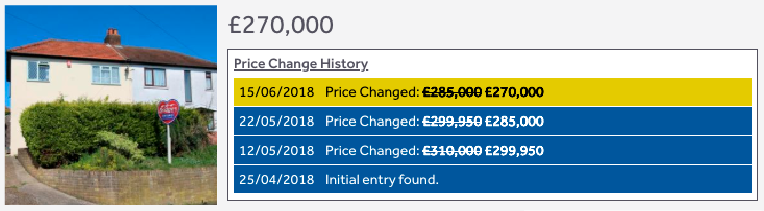
An ingenious free web browser add-on, Property Log, shows which sellers have altered the price on their listings. It does this by working with Chrome and Rightmove to show listings with tweaked asking prices, including cuts.
You can see when the property listing was initially put online, and each time they cut the price and by how much. These are useful bargaining chips in purchase negotiations. Even if you're not buying, the results are fascinating.
The best way to test it is just to try it. Installing is simple. If you don't already have Chrome, head over and follow the prompts to install. Then go to Property Log and hit the 'Add to Chrome' button. Once installed, go to Rightmove, do a search and sellers' price alterations will magically appear on a home's listing
Do note Property Log only works on desktop computers and laptops.
-
See property heat maps
For a colour-coded look at average sold prices, check out property heat maps from Mouseprice. Just enter a postcode to see if your street's red-hot or chilly, viewing street-by-street or zoom out to see whole towns' or counties' hues.
It's only available on Mouseprice pro, but you can get a seven-day free trial.
-
50+ home buying tricks
Considering buying? You need a battleplan. Armed with forumites' "what I wish I'd known" tales, we've drawn one up.
Our 50+ home buying tricks guide includes how to squeeze sellers for info, hidden costs, a deal-breakers' checklist and tips on solicitors and surveyors. There's also a 10 'last-ditch questions to ask sellers' checklist.
-
Analyse flood risk

While it may not be at the forefront of your mind, flooding has a significant impact on insurance premiums and a property's value.
Free websites quickly reveal how vulnerable a property is to flooding – possibly saving years of stress. If you are considering buying a home, use these before getting a survey. If they show a big flood risk, you'll save wasted survey fees.
The Government has flood risk maps with detailed reports on if and why an area's at risk. Check the maps for England, Wales, Scotland and Northern Ireland.
-
Check for pollution levels
Check if your area is a pollution hotspot by using the air quality checker on Gov.uk.
For even more detail, see where the cleanest and dirtiest air in the UK is using this interactive map from the Department for Environment, Food & Rural Affairs. It directs you to info from weekly graphs to pollutants detected in the last hour, while you can also filter by the likes of carbon monoxide and nitrogen dioxide.
-
Use a police crime mapping site
Take a look at the Police.uk crime mapping website for England, Wales and Northern Ireland. It breaks down recorded crimes by area, including burglary, robbery and anti-social behaviour, all of which impact insurance premiums.
-
Map nearby schools

Just moving to an area with a great state school doesn't mean your child will bag a spot. To help, Rightmove's school checker option shows which schools are nearby, plus their Ofsted rating.
Just search Rightmove for a town or postcode and click a home's listing. Scroll down to the 'schools' tab to see the nearest schools.
To gauge your chances of getting in, you're going to need to do some homework. For example, pore over your local authority's admissions criteria – some schools prioritise children in defined catchment areas, others on distance, religion or ability. Many ask you to prove residency over a certain period too.Compare school performance in England at Gov.uk, in Wales at My Local School, in Scotland at Education Scotland, in Northern Ireland at Department of Education.
Rankings and tables are only part of the picture of course – to find the right school for your child, nothing beats visiting in person. Listen to your gut and don't be afraid to ask questions about discipline, ethos, staff turnover and more.
-
Get the lowdown on the neighbours
Find out what kind of people live nearby using local Facebook groups. To find them, just plug in your town's name, then click the 'groups' tab.
Another useful resource is Crystal Roof. Enter a postcode and it generates a neighbourhood profile, listing everything from age to average household, incomes to air quality, train stations to local school performance.
Remember, if you're selling your current property and hosting the viewings yourself, make sure you know the answers to questions about the local area too as it could help you sell quicker. See our full guide on Selling your property.
-
Learn about local healthcare
See how far away the nearest GP, dentist or hospital is using the NHS website. It also provides information about exactly what facilities are available.
Fitness fans can search for gyms near their postcode using Hussle.
-
Check out the area's broadband coverage
If having a good internet connection is important to you, then it's important to check out the speed and coverage of the local area.
Our How to improve your broadband speed guide explains how to check the speed of your current internet and compare it against the area. The guide also suggests ways you can improve your internet speed.
-
Inspect neighbourhood statistics
For serious number-crunching on everything from marital status to religion of residents, look at the Government's local area reports.
-
Decide if it has good transport links

New transport links can mean an area is on the up. Use National Highways to find new roads and other projects in England. Transport Scotland and Gov.wales have similiar services.
For commuters, Commuter Maps shows which towns are the quickest hop from the office. Select a city, pick a max journey length, and it throws up the best commuter routes (including which station you'll arrive at).
-
Find yourself on Google Earth

Get a dizzyingly good view of your whole area using Google Earth, a free service that uses mapping technology to give aerial views from space.
Alternatively, search for 360-degree snaps of your home with Google Street View, or check out Geograph which has the aim of capturing every grid square in the UK in image.
-
Check how close you are to amenities or work
Use the web to find out how close you are to amenities, shops and work.
Good places to start include Google Maps and Crystal Roof. Simply type in a postcode, street name or general area and a map should pop up with relevant suggestions (Google can also provide directions).
Need more property help?
Buying a home timeline. See the steps involved.
Property search tips. How to find a dream home.
How to sell your home. See our top tips.
Share this guide?